
Sports
Enhance Your Home Server with These 5 Docker Compose Techniques

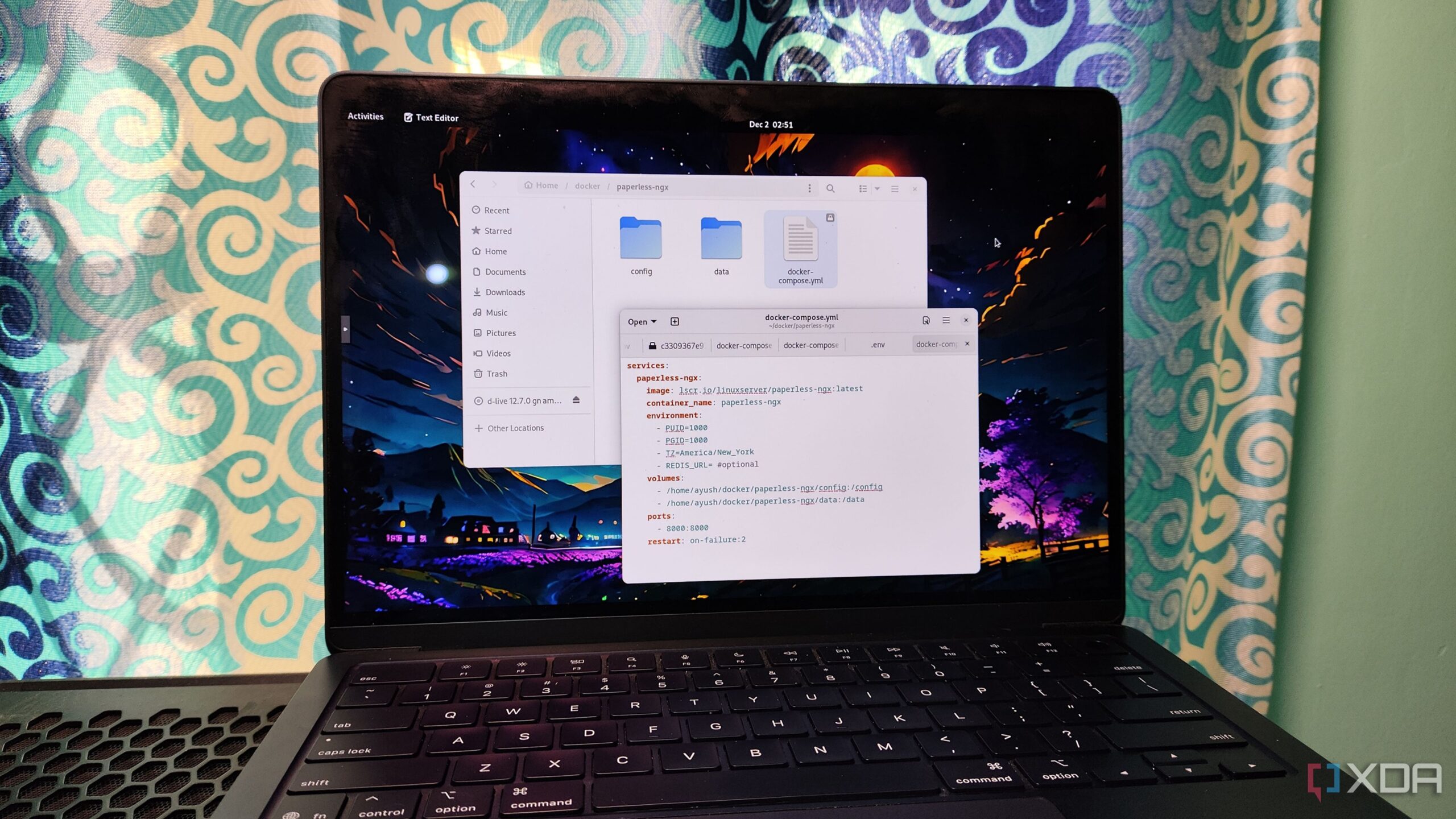
Docker has become a cornerstone for many in the self-hosting and home lab communities, largely due to its user-friendly tools and extensive library of both first- and third-party images. While the rise of alternatives like Podman is evident, Docker’s utility, particularly through Docker Compose, remains invaluable for containerization projects. Its compatibility with a wide range of services, from popular options like Nextcloud to lesser-known containers such as Ofelia, makes it a go-to choice. Here are five effective strategies that can help enhance the reliability of your home server using Docker Compose.
Organize Your Configuration Files
One of the first hurdles encountered when using Docker Compose is managing configuration files. Since Docker Compose operates primarily through the compose.yml (or docker-compose.yml) file, reusing the same document name for different containers can lead to complications. To avoid this, it is advisable to create separate folders for each container. For instance, the YAML file for Paperless-ngx can reside in its dedicated folder within the /home/containers directory. This structure not only keeps the configuration organized but also allows for easy access to associated data volumes and simplifies deployment if issues arise later.
Implement Health Checks for Stability
Containers that appear as “running” may not always be operational. Issues can arise from dependencies failing, leading to containers being unresponsive despite their status. To mitigate this, consider adding a healthcheck attribute in your compose.yml file. This feature enables Docker to verify whether a container is genuinely operational. If a container is in a failing state, Docker will label it as unhealthy, prompting users to troubleshoot. Adjusting settings like the start-period and retry-period can further refine the accuracy of these health assessments, reducing the risk of false positives during startup.
Establishing restart policies is vital for maintaining service availability. By configuring the restart attribute, you can ensure that essential applications automatically restart after an unexpected shutdown. Utilizing the on-failure flag, with a maximum of two retries, is a practical approach. This setup allows for recovery from transient errors while preventing endless restart loops that may indicate deeper issues.
Streamline Development with Docker Compose Watch
For developers, real-time feedback is crucial. The Docker Compose Watch functionality mimics the behavior of live server extensions found in code editors like VS Code. It synchronizes any changes made to the configuration file with the container images, allowing for automatic rebuilding when necessary. Although it requires additional permissions and binaries, the ability to see instant updates in code output and container images adds significant value to development environments.
Facilitate Device Access in Intensive Containers
Certain applications, particularly those requiring GPU support or USB device access, can benefit from the devices attribute in Docker Compose. While using Docker Desktop on Windows may pose challenges due to its reliance on virtual machines, Linux users can easily configure this attribute to enable access to PCI and USB peripherals. This setup is particularly beneficial for applications like Immich, which depend on hardware acceleration. Opting for unprivileged containers can enhance security while maintaining functionality.
Secure Your Environment Variables
For those managing complex containers, it is essential to handle sensitive information, such as credentials, effectively. Using an .env file to store these credentials is a recommended practice, especially for users who synchronize their Docker Compose files with online repositories. By adding the env_file attribute to the YAML document, you can keep sensitive data separate from the main configuration, enhancing security.
In summary, these five tips for utilizing Docker Compose can significantly improve the reliability of your home server. Whether it’s organizing configuration files, implementing health checks, or securing environment variables, these techniques provide a robust framework for effective container management. As the landscape of self-hosting continues to evolve, leveraging these strategies can lead to smoother operations and a more enjoyable user experience.

Giants Must Protect Jaxson Dart as Future Coach Evaluates Risks

Major Corporations Push for Ban on Intoxicating Hemp Sales in US

Community Mourns Babette “Babs” Rosenthal, 84, Civic Leader

Kane County Revises Roadwork Plans Amid Budget Adjustments

Amazon Pulls AI Dub from Banana Fish After Backlash

Trump Invites Netanyahu to White House for Urgent Talks

ECB’s Nagel Confirms Eurozone Inflation Near Target, Growth Ahead

26-Year-Old Google Engineer Shares 1-Year Journey to AI Role

Holiday Card Etiquette Sparks Debate Over Gendered Addressing

Urgent Update: Tom Aspinall’s Vision Deteriorates After UFC 321

MIT Scientists Uncover Surprising Genomic Loops During Cell Division

University of Hawaiʻi Joins $25.6M AI Project to Enhance Disaster Monitoring

AI Disruption: AWS Faces Threat as Startups Shift Cloud Focus

Time Crystals Revolutionize Quantum Computing Potential

Honeywell Forecasts Record Business Jet Deliveries Over Next Decade

Discover the Full Map of Pokémon Legends: Z-A’s Lumiose City

GOP Faces Backlash as Protests Surge Against Trump Policies

Parenthood Set to Depart Hulu: What Fans Need to Know
-
 Top Stories1 month ago
Urgent Update: Tom Aspinall’s Vision Deteriorates After UFC 321
-
 Health2 months ago
MIT Scientists Uncover Surprising Genomic Loops During Cell Division
-
Science4 weeks ago
University of Hawaiʻi Joins $25.6M AI Project to Enhance Disaster Monitoring
-
 Top Stories2 months ago
AI Disruption: AWS Faces Threat as Startups Shift Cloud Focus
-
 Science2 months ago
Time Crystals Revolutionize Quantum Computing Potential
-
 World2 months ago
Honeywell Forecasts Record Business Jet Deliveries Over Next Decade
-
 Entertainment2 months ago
Discover the Full Map of Pokémon Legends: Z-A’s Lumiose City
-
 Top Stories2 months ago
GOP Faces Backlash as Protests Surge Against Trump Policies
-
 Entertainment2 months ago
Parenthood Set to Depart Hulu: What Fans Need to Know
-

 Politics2 months ago
Judge Signals Dismissal of Chelsea Housing Case Citing AI Flaws
-

 Sports2 months ago
Yoshinobu Yamamoto Shines in Game 2, Leading Dodgers to Victory
-

 Health2 months ago
Maine Insurers Cut Medicare Advantage Plans Amid Cost Pressures