
Top Stories
Master the Linux Terminal: 6 Essential Habits to Boost Efficiency NOW

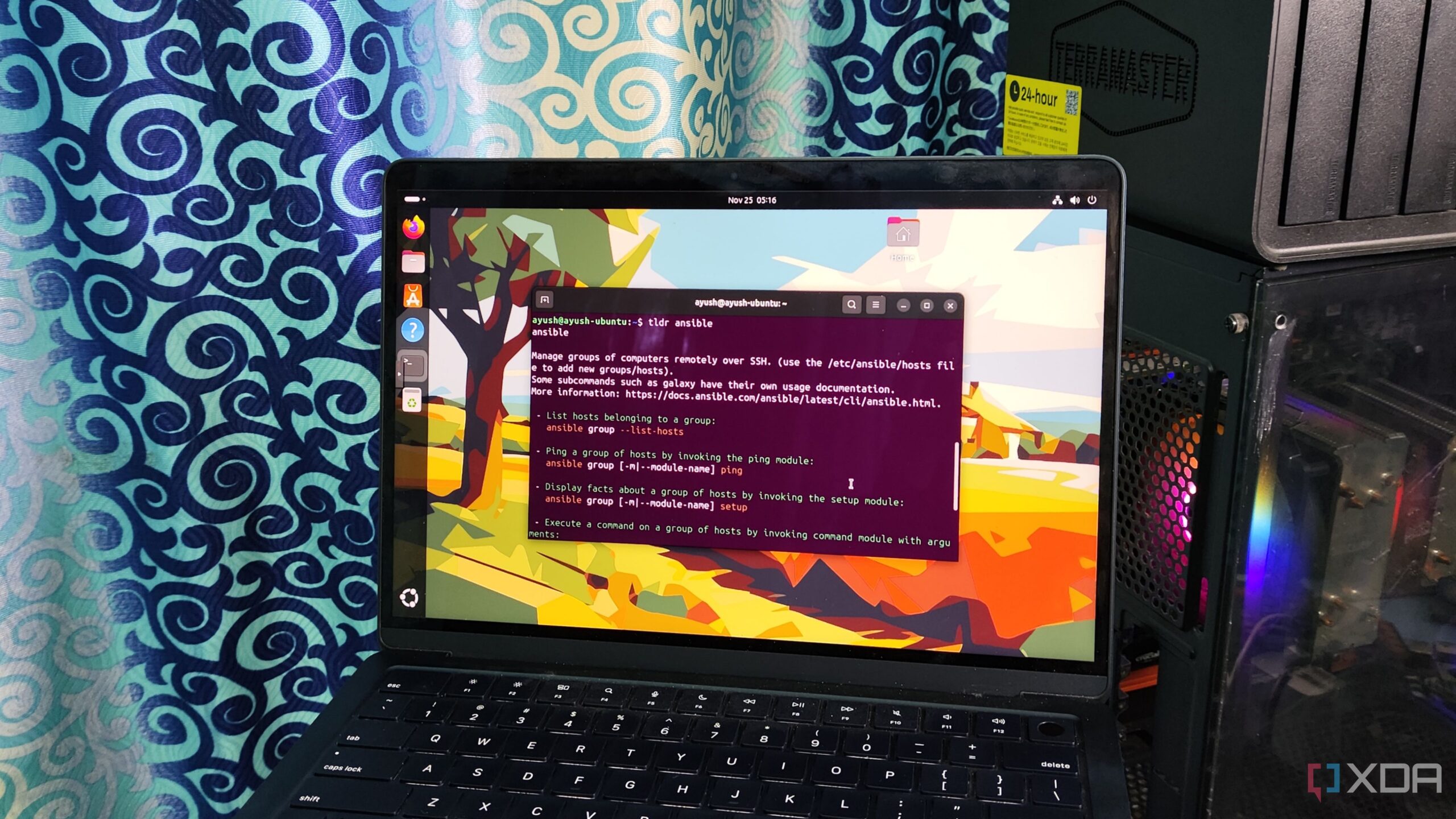
URGENT UPDATE: Linux enthusiasts are discovering vital terminal habits that can significantly enhance productivity. As of today, users are urged to adopt these six essential practices to transform their command-line experience immediately.
Many users transitioning from Windows to Linux find the terminal intimidating. However, recent insights reveal that mastering the command line can streamline tasks and eliminate frustration. Here are the crucial habits that can revolutionize your workflow right now.
1. Reusing Old Commands
One common struggle is retyping long commands. Fortunately, Linux offers powerful shortcuts. The !! operator lets users recall the last executed command, perfect for repeating tasks. Alternatively, the !$ operator retrieves the last argument, making it easier to modify commands without starting from scratch. For frequent commands, the history command and Ctrl+R for reverse search are game-changers.
2. Simplifying Help Pages with tldr
Navigating help pages can be cumbersome, but the tldr package is a lifesaver. It condenses essential commands and flags into manageable summaries, allowing users to quickly grasp new tools without sifting through extensive documentation. This is especially crucial for those unfamiliar with terminal commands.
3. Combining Commands for Efficiency
Executing multiple commands in one line can save time. The ; operator allows sequential execution, while && ensures that subsequent commands run only if the previous one succeeds. For troubleshooting, the || operator executes commands only if the previous command fails, providing a robust method for managing errors.
4. Troubleshooting with lsof
Users often face issues with faulty processes or port conflicts. The lsof command is invaluable for tracking processes and their associated network sockets, helping users identify and resolve issues efficiently. This is particularly important for developers and system administrators managing multiple applications.
5. Managing Permissions Safely
Linux permissions can be complex, especially for newcomers. Users are warned against using chmod 777 indiscriminately, as it poses security risks. Instead, adopting chmod 755 or chmod 555 can safeguard critical files from accidental modifications while maintaining necessary access.
6. Automating Tasks with Cron Scripts
Automation is key to maximizing productivity. Linux supports job scheduling through cron scripts, enabling users to automate backups, cache clearing, and service checks at specified intervals. While mastering cron syntax may require practice, the benefits of automation are undeniable.
These six terminal habits are transforming how users interact with Linux. By implementing these practices, both new and seasoned users can enhance their efficiency and minimize frustration in their daily tasks.
WHAT’S NEXT: Linux users are encouraged to start incorporating these habits immediately. As the community continues to share tips and tricks, staying updated with the latest practices is essential for maintaining a productive workflow in an ever-evolving digital landscape.
Stay tuned for more updates on Linux tools and best practices as they emerge!

Shark Teeth Study Reveals Urgent Clues to Prevent Extinction

Church Members Rally Together After Thanksgiving Fire Devastation

U.S. Investment in Canadian Energy Firms Surges Despite Low Oil Prices

Nick Jonas Unveils New Solo Album ‘Sunday Best’ Set for February Release

Researchers Urge Label Changes for Low-Alcohol Drinks to Aid Pregnant Women

Wedding Cookie Table Community Aims for World’s Largest Cookie Exchange

Mayor Appoints Alan Wong as New Supervisor for District 4

UK Report Reveals Growing Role of AI in University Research Assessments

Mayor Lurie Appoints Alan Wong as New District 4 Supervisor

Urgent Update: Tom Aspinall’s Vision Deteriorates After UFC 321

MIT Scientists Uncover Surprising Genomic Loops During Cell Division

University of Hawaiʻi Joins $25.6M AI Project to Enhance Disaster Monitoring

AI Disruption: AWS Faces Threat as Startups Shift Cloud Focus

Time Crystals Revolutionize Quantum Computing Potential

Honeywell Forecasts Record Business Jet Deliveries Over Next Decade

Discover the Full Map of Pokémon Legends: Z-A’s Lumiose City

GOP Faces Backlash as Protests Surge Against Trump Policies

Parenthood Set to Depart Hulu: What Fans Need to Know
-
 Top Stories1 month ago
Urgent Update: Tom Aspinall’s Vision Deteriorates After UFC 321
-
 Health1 month ago
MIT Scientists Uncover Surprising Genomic Loops During Cell Division
-
Science4 weeks ago
University of Hawaiʻi Joins $25.6M AI Project to Enhance Disaster Monitoring
-
 Top Stories1 month ago
AI Disruption: AWS Faces Threat as Startups Shift Cloud Focus
-
 Science2 months ago
Time Crystals Revolutionize Quantum Computing Potential
-
 World2 months ago
Honeywell Forecasts Record Business Jet Deliveries Over Next Decade
-
 Entertainment1 month ago
Discover the Full Map of Pokémon Legends: Z-A’s Lumiose City
-
 Top Stories2 months ago
GOP Faces Backlash as Protests Surge Against Trump Policies
-
 Entertainment2 months ago
Parenthood Set to Depart Hulu: What Fans Need to Know
-

 Politics2 months ago
Judge Signals Dismissal of Chelsea Housing Case Citing AI Flaws
-

 Sports2 months ago
Yoshinobu Yamamoto Shines in Game 2, Leading Dodgers to Victory
-

 Health2 months ago
Maine Insurers Cut Medicare Advantage Plans Amid Cost Pressures